



 واتساپ تجاری
بروزرسانی شده
App Cloner 4.0.10 دانلود اپ کلونر با لینک مستقیم نسخه اصلی
اپ کلونر
App Cloner دانلود اپ کلونر با لینک مستقیم در اندروید
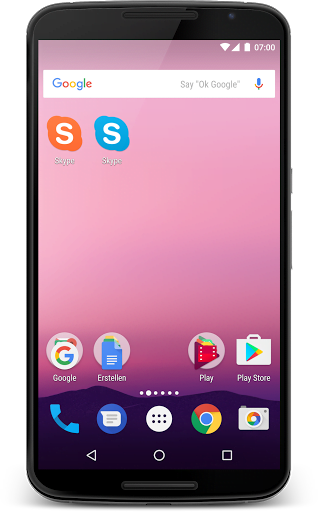
اپ کلونر (App Cloner) یک ابزار قدرتمند و کاربردی برای ساخت نسخههای مستقل از اپلیکیشنهای نصبشده روی دستگاه اندروید است. با دانلود اپ کلونر، میتوانید از یک برنامه مانند واتساپ، تلگرام یا اینستاگرام، چندین نسخه موازی ایجاد کنید و همزمان با چند اکانت مختلف در آنها فعالیت نمایید. این برنامه امکان شخصیسازی پیشرفته مانند تغییر نام، آیکن، رنگ و حتی تعیین محل نصب (حافظه داخلی یا کارت SD) را فراهم کرده و نسخه کلونشده را به یک اپلیکیشن مستقل و سفارشی تبدیل میکند.
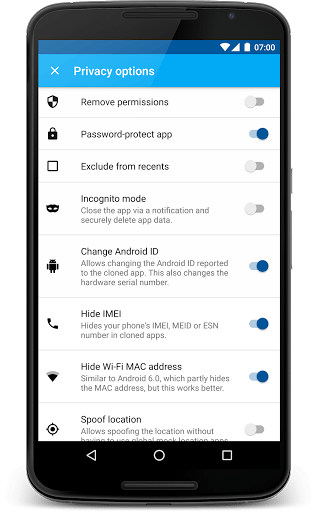
با دانلود برنامه اپ کلونر، علاوه بر ایجاد نسخههای موازی، میتوانید دسترسیهای برنامه اصلی را محدود کنید، رمز عبور روی نسخه کلونشده قرار دهید و تنظیمات پیشرفتهای مانند غیرفعال کردن سرویسهای خاص یا تغییر شناسه برنامه را اعمال نمایید. این ویژگیها اپ کلونر را از یک ابزار ساده کلونسازی فراتر برده و آن را به یک پلتفرم مودینگ سبک و امن برای کاربران حرفهای تبدیل کرده است. نسخه ارائهشده کاملاً کامل و بدون محدودیت است و تمامی امکانات آن در دسترس کاربران قرار دارد.
اگر به دنبال راهحلی برای استفاده همزمان از چند حساب کاربری در یک اپلیکیشن یا شخصیسازی برنامههای مورد علاقه خود هستید، اپ کلونر انتخاب ایدهآلی است. برای دانلود اپ کلونر با لینک مستقیم میتوانید آخرین برزورسانی برنامه را از وب سایت براتو دانلود کنید. همین امروز این برنامه را نصب کرده و کنترل کامل روی اپلیکیشنهای خود را تجربه نمایید.
قابلیت های برنامه آپ کلونر App Cloner :
- ساخت نسخههای موازی (کلون) از برنامههای نصبشده
- استفاده همزمان از چند حساب کاربری در یک اپلیکیشن
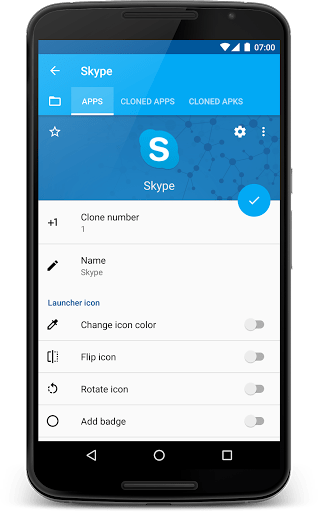
- شخصیسازی پیشرفته: تغییر نام، آیکن، رنگ و تم
- قراردادن رمز عبور روی نسخه کلونشده
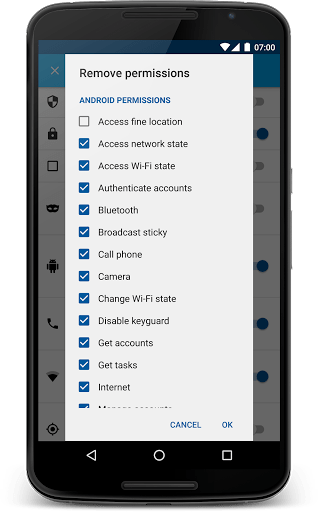
- مدیریت دسترسیها: غیرفعالکردن یا محدودسازی مجوزهای برنامه
- تعیین محل نصب: حافظه داخلی یا کارت SD
- تغییر شناسه (Package Name) برنامه
- ایجاد نسخههای مستقل بدون ارتباط با برنامه اصلی
- حذف تبلیغات داخلی برخی برنامهها (در صورت پشتیبانی)
- ابزار مودینگ سبک برای کاربران پیشرفته
- نسخه کامل و بدون محدودیت (بدون نیاز به خرید درونبرنامهای)
تغییرات اپ کلونر جدید :
- رفع مشکلات و بهبود عملکرد نرم افزار
اشتراک گذاری:









بدرد نمیخوره تمام
سلام خسته نباشی
آیا با این نسخه میشه برا برنامه ای که کد ملی میخواد کاری کنیم که کد ملی نیاز نداشته باشه؟
سلام
نه نمیشه چون نیاز به ثبت در سرور هست
سلام خسته نباشید من یه مدتی یه نسخه ازین برنامه رو دانلود کردم برای کلون کردن اینستاگرام تبدیل ایموجی ها به آیفون بعد متاسفانه این برنامه برای من Instagram crashedایجاد کرد و من مجبور شدم گوشیمو فلش کنم تا درست بشه الان آیا اگر این نسخه که شما قرار دادین دانلود کنم اون مشکل دیگه پیش نمیاد؟؟ ممنون
سلام
برنامه ای که مشکل داشت رو باید حذف و مجدد نصب میکردی تا مشکل رفع بشه نیاز به فلش گوشی نبوده …
نسخه موجود رو من دارم بدون مشکل بوده …
ببخشید چجوری با یه نسخه ی دیگه از دیوار تست کنم.
نسخه قدیمی برنامه رو نصب کنید یا از برنامه های دیگه مثل پارالل اسپیس رو نصب کنید برای داشتن چند دیوار
سلام ببخشید من وقتی برنامه دیوار کلون میکنم،نصب میشه ولی وقتی وارد میشم می پره بیرون.
سلام
روی همه برنامه های جواب نمیده با نسخه های دیگه از دیوار تست کنید
ببخشید اقای زاکری برای من اصلا دانلود نمیشع توروخدا راهکار بدید
گزینه دانلود فایل نصبی با لینک مستقیم رو بزنید مشکلی برای دانلود نداره
سلام من گوشیمو به روز کردم بعد برنامه های که تو آپ کلون کردم الان باز نمیشه چیکار کنم ؟
سلام
مجدد باید کلون کنی تا مشکل رفع بشه نسخه اصلی رو به اخرین نسخه بروز کن و سپس نسخه کلون ها رو به روز کن
بسیار عالی بدون هیچ مشکلی!
سلام چرا برا من کار نمیکنه ،گوشیم اپ کردم الان باز نمیشه
سلام
برنامه رو حذف و از اول نصب کنید همچنین اگه ارور خاصی میده متن ارور رو بگید
اصلا نصب نمیشه برنامهههه چرااا؟؟؟ لطفا جواب بدید
اصلا اجرا نمیشه کمک کنید
برای آپدیت ها مشکلی نداره
سلام بعد از نصب بشکل ذیل پیام خطا می دهد
UNFORTUNATELY,APP CLONER HASSTOPPED
لطفا راهنمائی بفرمائید
سلام
خود برنامه یا برنامه کلون شده ؟
اگه برنامه کلن شده اینجوری شده احتما نمیشه اون برنامه رو کلون کرد
آقای زاکری برنامه ی پارالل اسپیس و اپ کلون رو میگم اخه پایین ازم سوال کردین ازتون میخوام لطفا اپ کلونر رو درست کنین ممنون میشم??
اپ کلونر که مشکلی نداره ولی روی همه برنامه جواب نمیده …
سلام آقای زاکری شما به من گفتید چک کن منم چک کردم بازم نشد حالا برای اینکه مطما بشین خودتون هم چک کنین آقای زاکری خواهش میکنم اپ کلونر رو درست کنین تا بتونیم اکانت بیشتر درست کنیم همش ارور میده ممنون میشم درست کنین?????❤️
سلام
چه برنامه ای ؟
سلام آقای زاکری
آقای زاکری غیر از برنامه پارالل اسپیس و اپ کلونر چه برنامه دیگری هست که بشه اکانت بیشتر بسازیم آخه برنامه هایی که با اپ کلونر میسازیم واردش نمیشه و پارالل اسپیس هم فقط یکی میشه لطفا آقای زاکری بگین چه برنامه ای نصب کنم؟؟؟
سلام
اگه دسترسی به پلی استور داری برنامه پارالل اسپیس رو جستجو کن زیرش برنامه های مشابه میاد برات اگه هم نمیتونی بگو چک کنم
سلام من برنامه منچرز کلون کردم نصب شده وارد برنامه هم میشه ولی اجرا نمیکنه ینی بازیو شروع نمیکنه باید چیکار کنم با فیلتر هم وارد شدم ولی نشد لطفا راهنمایی کنید
سلام
با برنامه پالل اسپیس تست کنید
سلام. نسخه ی پرمیوم برای ورژن 2.2.1 رو کی قرار میدید؟
سلام
زمانش مشخص نیست